Telescope Position
The telescope position plugin displays live telescope and target positions.
Note
In order to successfully use this plugin, it is necessary to write a custom companion plugin to provide the status necessary to draw these positions. If you didn’t create such a plugin, it will look as though the telescope is parked.
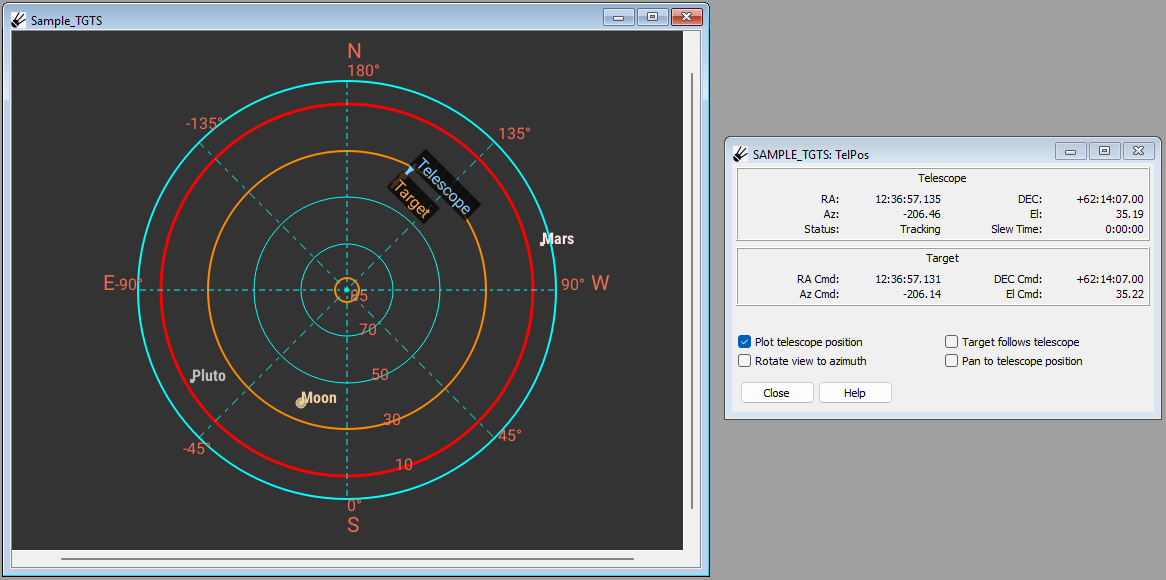
The telescope and target positions are shown in both Right Ascension/Declination and Azimuth/Elevation. RA and DEC are displayed in sexagesimal notation as HH:MM:SS.SSS for RA, and DD:MM:SS.SS for DEC. AZ and EL are both displayed in degrees as decimal values. In the “Telescope” section, the telescope status, such as pointing or slewing, is shown along with the slew time in h:mm:ss.
The “Plot telescope position” button will show the Target and Telescope positions on the Targets window when the button is selected.
The “Rotate view to azimuth” button will orient the Targets window so the telescope azimuth is always facing towards the top of the screen.
The “Pan to telescope position” button will pan the polar sky plot to center the target in the Targets window.
Note
If you have working telescope status integration, the “Target follows telescope” button will select a target from the target list which matches the telescope pointing. Similarly, selecting this option will unselect all targets if the telescope is not pointing toward a target from the target list. If a target is manually selected from the target list while this option is selected, this option will be unselected to avoid conflicts.
Enabling Plugin
This plugin in not enabled by default. To enable it, first go to “PluginConfig”, which may be found by pressing “Operation” at the bottom left and then going to “Debug” and then “PluginConfig”. Find “Telescope Position” from the list of plugins, then press “Edit” and then check the checkbox next to “Enabled”. Press “Set”, then close the window and press “Save”. Restart SPOT and the plugin should appear on the control panel.
Writing a Companion Plugin
Download the SPOT source code and look in the “spot/examples” folder for a plugin template called “TelescopePosition_Companion”. Modify as described in the template.