Site Selector
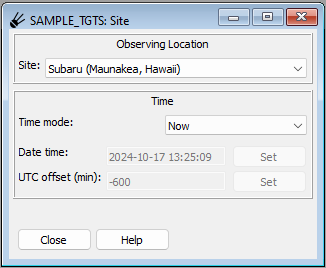
The SiteSelector plugin is used to select the location from where you are planning to observe, as well as the time of observation at that location.
You will almost always want to start this plugin first, because it controls many of the aspects of the other plugins visible on the workspace.
Important
Closing this plugin can cause other plugins to not work
as expected. SiteSelector is important as the source of
time updates for almost all the other plugins, and if you
close it completely the time tracker there will no longer
trigger updates in those other plugins. If in doubt,
start and minimize this plugin instead of closing.
Setting the observing location
Use the “Site:” drop-down menu to select the observing location. There are a number of predefined sites available.
Adding your own custom observing location
If your desired location is not available, you can easily add your own. If you have the SPOT source code checked out, you can find the file “sites.yml” in …/spot/spot/config/. Copy this file to $HOME/.spot and edit it to add your own site. Be sure to set all of the keywords for your site (latitude, longitude, elevation, etc). Restart spot and you should be able to pick your new location from the list.
Setting the time of observation
The time can be set to the current time or a fixed time. To set to the current time, chose “Now” from the “Time mode:” drop-down menu.
To set a fixed time, chose “Fixed”–this will enable the “Date time:” and “UTC offset (min):” controls. Enter the date/time in the first box in the format YYYY-MM-DD HH:MM:SS and press “Set”.
By default the UTC offset of the fixed time will be set to that of the timezone of the observing location; but you can enter a custom offset (in minutes) from UTC in the other box and press “Set” to indicate a special offset for interpreting the time.
Note
this does NOT change the timezone of the observing location; it just sets the interpretation of the fixed time you are setting.
Updating of plugins
Whenever you change the observing location or the time, the other plugins should update automatically (if they subscribe for site and time changes, which most are designed to do).