Target Generator
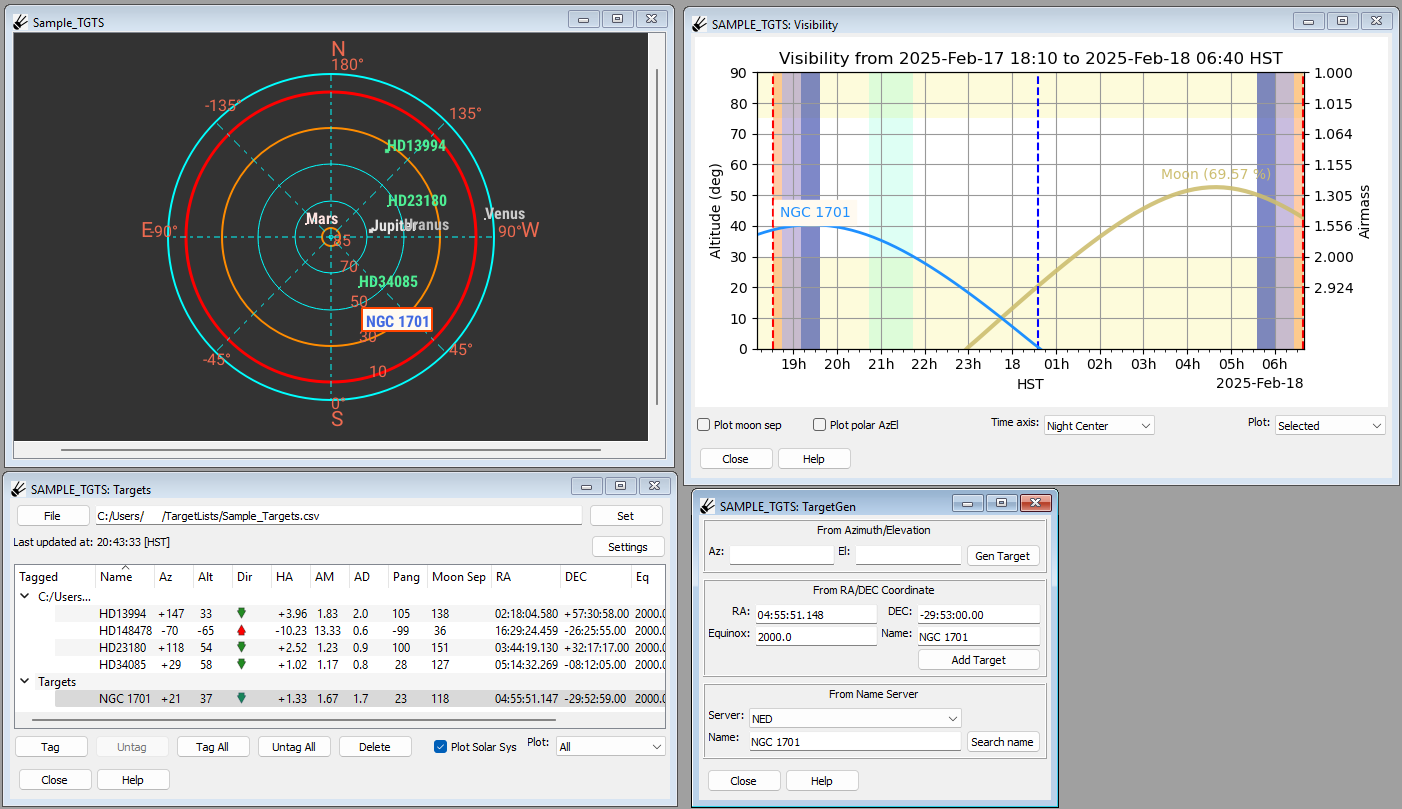
The target generator plugin adds targets to the target list. Targets can be created any of three ways, from the azimuth and elevation, from RA and DEC coordinates, or by looking up an object by name.
Azimuth/Elevation
To create a target from a specified azimuth and elevation, fill in the azimuth and elevation under “From Azimuth/Elevation” and press “Gen Target”. The RA and DEC will be automatically filled out along with the equinox and name under “From RA/DEC Coordinate”. Press “Add Target” and the target will be added to the Target List under the “Targets” section.
RA/DEC Coordinate
To create a target from a specified right ascension and declination, fill in the RA, DEC, Equinox, and Name under “From RA/DEC Coordinate” and press “Add Target”. The target will be added to the Target List under the “Targets” section.
Name Server
To create a target from a named object, fill in the name under “From Name Server” and select whether you would like to search the NASA/IPAC Extragalactic Database (NED) (https://ned.ipac.caltech.edu/) or the SIMBAD Astronomical Database (http://simbad.cds.unistra.fr/simbad/). Press “Search name”, and if the object is found the RA and DEC will be automatically filled out along with the equinox and name under “From RA/DEC Coordinate”. Press “Add Target” and the target will be added to the Target List under the “Targets” section.
Editing Targets
Each target must have a unique name. To edit an existing target, enter the new coordinates into the target generator and add the name of the target to be edited in the “Name” field, then press “Add Target”.